FreeTestPanel = Automated test screen creation tool
How do I get a freshly written program to work right away?
When you write a program and want to run it, how do you do it?
Let’s say it is a function program that has multiple arguments, does some processing internally, and returns the result as a return value. In this case, most people would probably do one of the following
- Create a console application to call the function program and pass back the arguments entered from the console.
- Use a unit testing framework to write a test program that passes various argument combination patterns to the target program.

With the former method, when the console application handles multiple test programs, the logic becomes complicated. With the latter method, you can basically only pass the test pattern of the arguments described in the unit test program to the program under test. If you want to execute the program with arbitrary arguments, you need to stop the program at an appropriate breakpoint and call it from the IDE’s Immediate window.
If you are familiar with programming, you may want to create a Windows or Web application that can run multiple programs under test and allow you to freely enter arguments from the screen. This will give you a lot more flexibility in your test program.

However, isn’t this a bit inconvenient? As the number of programs to be tested increases, we need to select the test program to be executed, set the input area according to the arguments of each method, convert the input values to argument values, and display the execution results. It would be a lot of man-hours to code each of these.
FreeTestPanel solves this problem!
FreeTestPanel is a tool for automatically creating screens for executing test programs that was created to solve this problem.
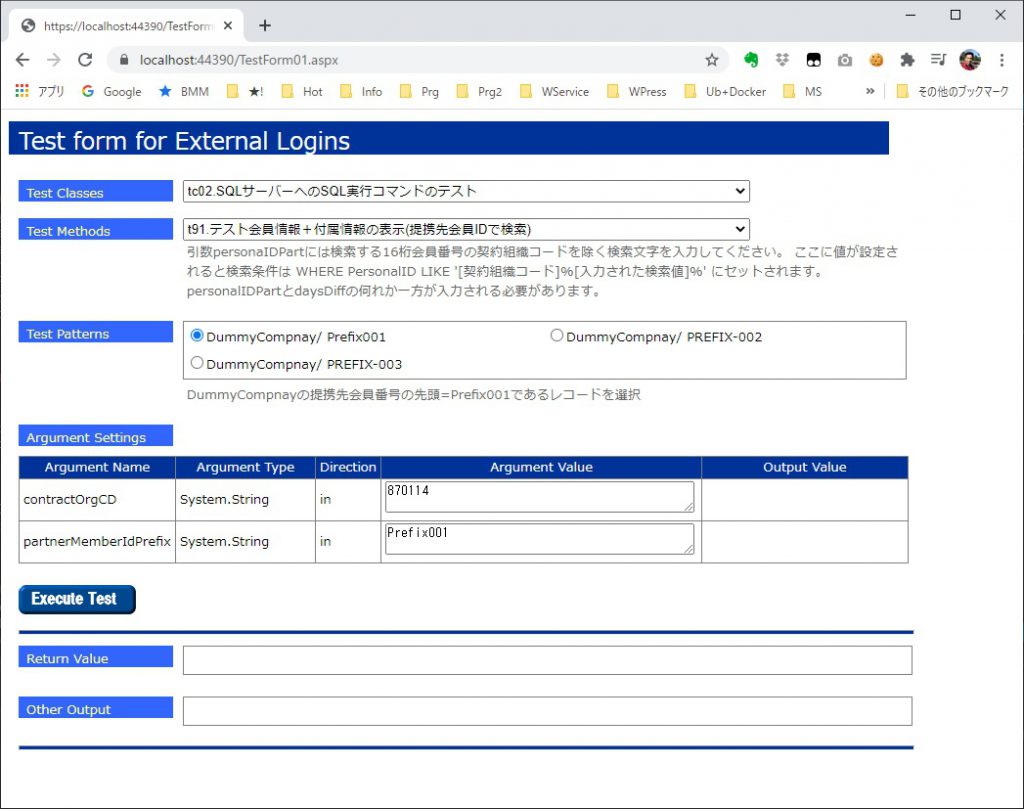
By adding the specified attributes to the class and method definitions of the test program, it will automatically create a test screen with the web application. When you select a test class or a test method from the created screen, the argument input area will automatically change to allow you to freely set values. It is also possible to have the user select a combination of values for the arguments from the pre-registered patterns.
The following is a coding example of a test program that automatically generates an execution screen. The classes and methods qualified by the highlighted [FreeTestClass], [FreeTestMethod], and [FreeTestPattern] attributes are the classes, methods, and test patterns displayed on the automatically generated test screen. displayed on the automatically generated test screen.
using EmotionSoft.ewd2.SimpleUT;

namespace SocialLoginWebAPITest.App_Code
{
    [FreeTestClass("tc02.SQLサーバーへのSQL実行コマンドのテスト")]
    public class tc02_SQL_ExecTest : WebFreeTestFixture
    {
        protected String TargetContractOrgCD { get; set; }
        protected String TargetContractOrgName { get; set; }

        [FreeTestMethod("t91.テスト会員情報+付属情報の表示(提携先会員IDで検索)",
@"引数personaIDPartには検索する16桁会員番号の契約組織コードを除く検索文字を入力してください。
ここに値が設定されると検索条件は
WHERE PersonalID LIKE '[契約組織コード]%[入力された検索値]%'
にセットされます。
personalIDPartとdaysDiffの何れか一方が入力される必要があります。")]
        public void t91_ShowDmySiteMembershipByIdPrefix(String contractOrgCD, String partnerMemberIdPrefix)
        {
            String connStr = MyTestContext.GetConnectString();
            SqlDataSourceParameterList srcParamList = new SqlDataSourceParameterList();

            String whereClause = SetWhereClauseByPartnerMemberIDPrefix("PersonalID",
                contractOrgCD, partnerMemberIdPrefix, ref srcParamList);

            SqlDbController myDAC = new SqlDbController(connStr);

            //結果確認
            String strSQL =
@"SELECT
    '0x' + LIFE_ContractOrgCD AS 組織コード,
    SUBSTRING(PersonalID, 2, 14) as 会員ID,
	ConfirmationGUID AS 確認用ワンタイムID,
	PartnerMemberID AS 提携先会員ID,
    EMailAddress AS  メルアド,
    ProvisionalEMailAddress AS 保留メルアド,
    EMailAddressConfirmLimit メルアド確認期限
FROM Mst_DmySite_Membership";
            strSQL += Environment.NewLine + whereClause;
            this.ShowResultData(connStr, strSQL, srcParamList, "Mst_DmySite_Membership");
            strSQL =
@"SELECT
    Update_Time, Update_User, Update_PGM, Muko_Flg
    ,LIFE_ContractOrgCD, PersonalID
    , ItemName, ItemValue
FROM Mst_DmySite_MemberExtraInfo";
            strSQL += Environment.NewLine + whereClause;
            this.ShowResultData(connStr, strSQL, srcParamList, "Mst_DmySite_MemberExtraInfo");
        }

        [FreeTestPattern("t91_ShowDmySiteMembershipByIdPrefix;" +
            "t92_ShowTestUserAllInfoByIdPrefix;t93_ShowDmySiteMembershipByIdPrefixDetails;t98_DeleteMemberRecordPersonalID16",
            true, true)]
        public virtual List<String[]> ShowDmySiteMemberMastersTestPattern
        {
            get
            {
                var result = new List<String[]>();
                result.Add(new String[] { TargetContractOrgCD, "Prefix001",
                    TargetContractOrgName + "の提携先会員番号の先頭=Prefix001であるレコードを選択",
                    TargetContractOrgName + "/ Prefix001"});
                result.Add(new String[] { TargetContractOrgCD, "PREFIX-002",
                    TargetContractOrgName + "の提携先会員番号の先頭=PREFIX-002であるレコードを選択",
                    TargetContractOrgName + "/ PREFIX-002"});
                result.Add(new String[] { TargetContractOrgCD, "PREFIX-003",
                    TargetContractOrgName + "の提携先会員番号の先頭=PREFIX-003であるレコードを選択",
                    TargetContractOrgName + "/ PREFIX-003"});
                return result;
            }
        }
Convenient Features that Know the Point of Development
FreeTestPanel’s features don’t stop there. FreeTestPanel has functions for querying DBs and external files, which are necessary for business applications and web applications. As a result of executing the program under test, you can see how the contents of the DB have been rewritten. You can easily verify how the contents of the DB are rewritten or how the contents of the output XML or Json files are changed.
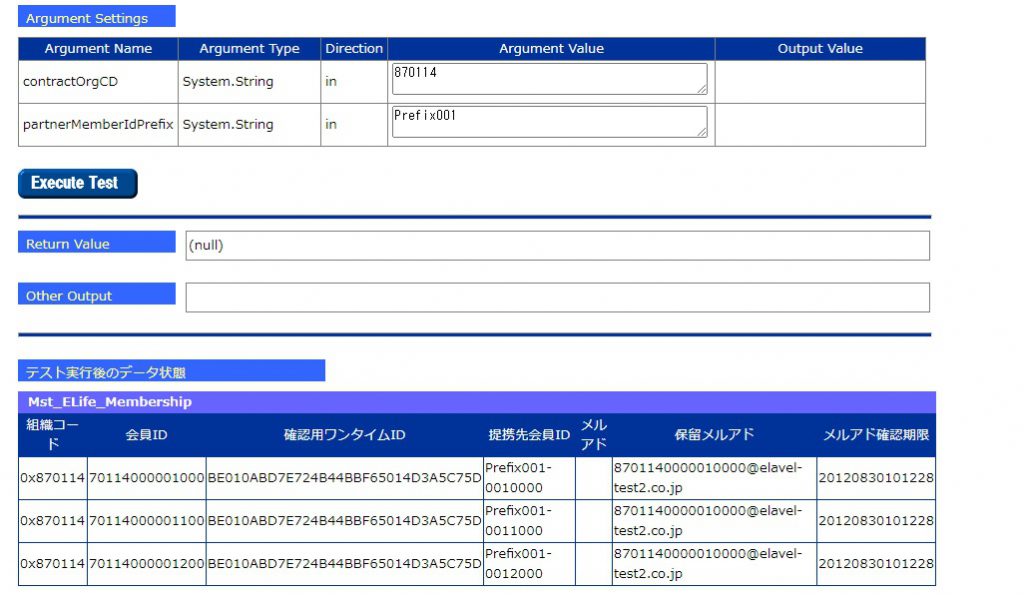
In addition, since the automatically generated screen is a web application, if the program under test uses HttpContext, you can use the real HttpContext used by the web application instead of Mock. Not only does this save you the trouble of creating a Mock, but it also allows you to change the state of the Session and Cache prior to the test and query the state changes after the test is run. This makes debugging much more productive.
Use in the Operations Department
Although it was originally created as a tool for unit testing, its usage is not limited to unit testing. By automatically generating an argument input area, and by making argument combinations selectable as a pattern, it can be used as a tool for assisting work in the system operation department.
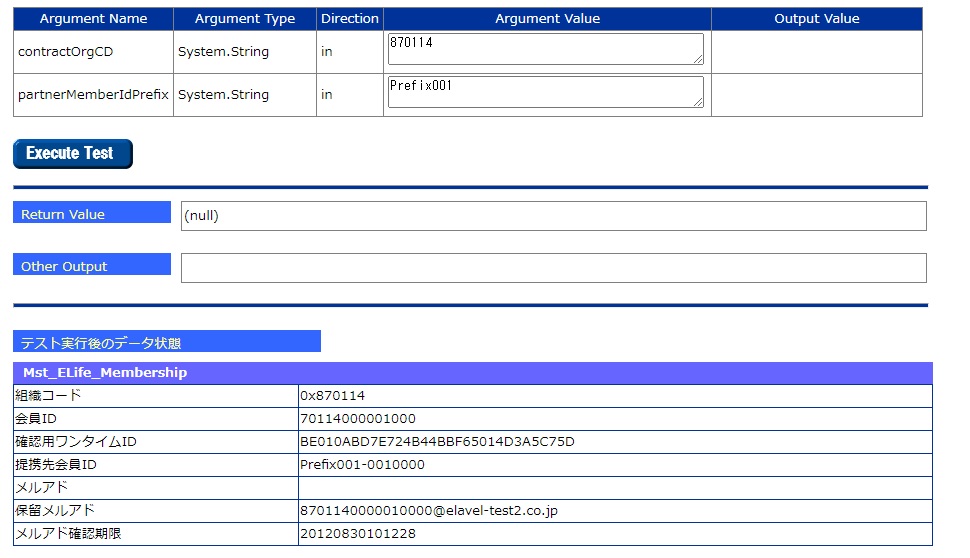
For example, in the field of DevOps operations, standardized tasks such as DB maintenance can be registered as test methods, which can be selected and executed from a web application using FreeTestPanel. By linking the user privileges in the authentication information with the selectable test classes and test methods, you can complete an application that is even closer to an operational application.
Release Schedule
Scheduled for early summer of 2021
* NET Framework WebForm, but we plan to create a .NET 5.0 version soon and release a product that can also run on MVC and RazorPage applications.